
Introducing Showboat and Rodney, so agents can demo what they’ve built
Plus I was given a really nice new mug

In this newsletter:
Introducing Showboat and Rodney, so agents can demo what they’ve built
Plus 7 links and 2 quotations and 1 note
If you find this newsletter useful, please consider sponsoring me via GitHub. $10/month and higher sponsors get a monthly newsletter with my summary of the most important trends of the past 30 days - here are previews from October and November.
Introducing Showboat and Rodney, so agents can demo what they’ve built - 2026-02-10
A key challenge working with coding agents is having them both test what they’ve built and demonstrate that software to you, their supervisor. This goes beyond automated tests - we need artifacts that show their progress and help us see exactly what the agent-produced software is able to do. I’ve just released two new tools aimed at this problem: Showboat and Rodney.
Rodney: CLI browser automation designed to work with Showboat
Test-driven development helps, but we still need manual testing
Proving code actually works
I recently wrote about how the job of a software engineer isn’t to write code, it’s to deliver code that works. A big part of that is proving to ourselves and to other people that the code we are responsible for behaves as expected.
This becomes even more important - and challenging - as we embrace coding agents as a core part of our software development process.
The more code we churn out with agents, the more valuable tools are that reduce the amount of manual QA time we need to spend.
One of the most interesting things about the StrongDM software factory model is how they ensure that their software is well tested and delivers value despite their policy that “code must not be reviewed by humans”. Part of their solution involves expensive swarms of QA agents running through “scenarios” to exercise their software. It’s fascinating, but I don’t want to spend thousands of dollars on QA robots if I can avoid it!
I need tools that allow agents to clearly demonstrate their work to me, while minimizing the opportunities for them to cheat about what they’ve done.
Showboat: Agents build documents to demo their work
Showboat is the tool I built to help agents demonstrate their work to me.
It’s a CLI tool (a Go binary, optionally wrapped in Python to make it easier to install) that helps an agent construct a Markdown document demonstrating exactly what their newly developed code can do.
It’s not designed for humans to run, but here’s how you would run it anyway:
showboat init demo.md ‘How to use curl and jq’
showboat note demo.md “Here’s how to use curl and jq together.”
showboat exec demo.md bash ‘curl -s https://api.github.com/repos/simonw/rodney | jq .description’
showboat note demo.md ‘And the curl logo, to demonstrate the image command:’
showboat image demo.md ‘curl -o curl-logo.png https://curl.se/logo/curl-logo.png && echo curl-logo.png’
Here’s what the result looks like if you open it up in VS Code and preview the Markdown:
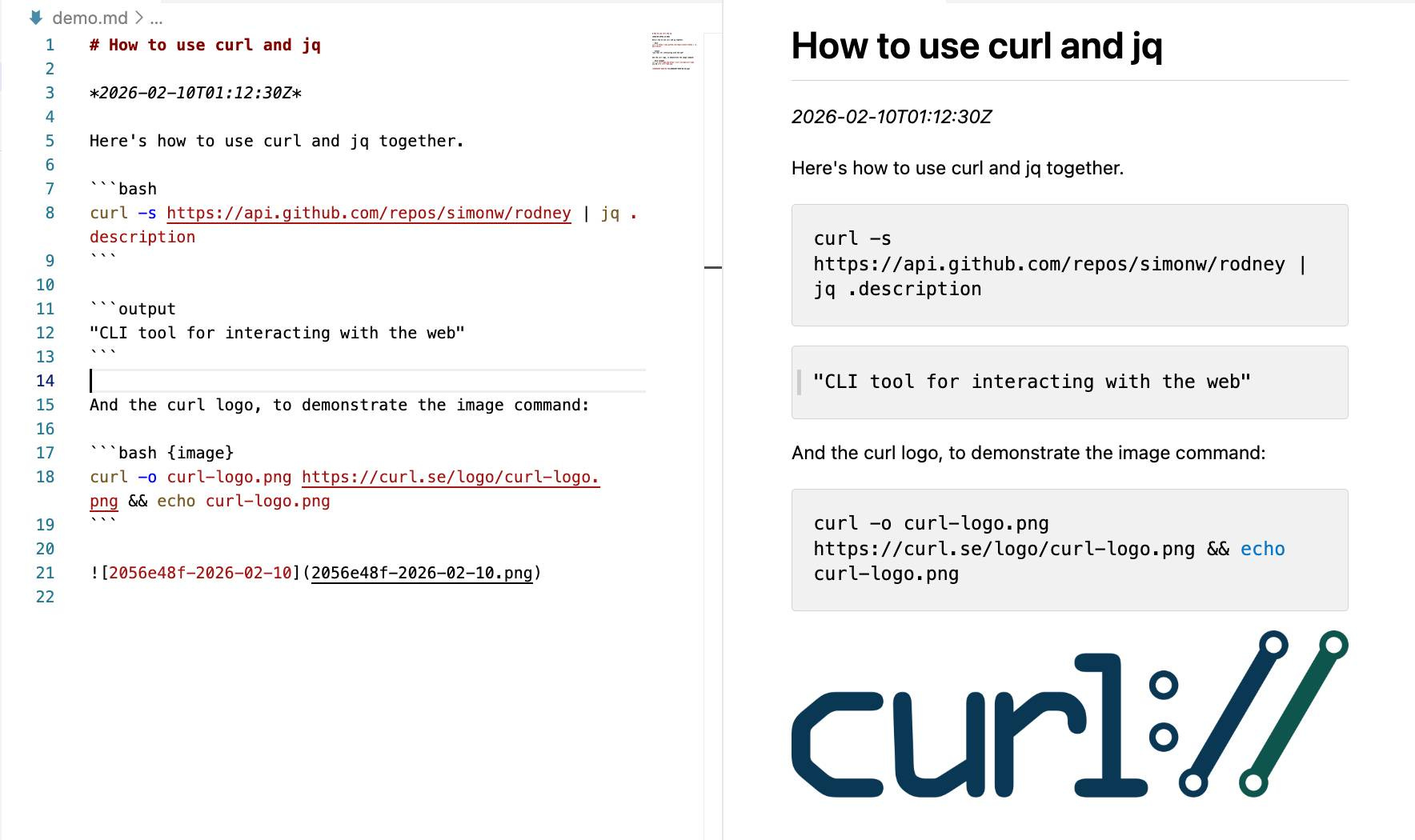
Here’s that demo.md file in a Gist.
So a sequence of showboat init, showboat note, showboat exec and showboat imagecommands constructs a Markdown document one section at a time, with the output of those exec commands automatically added to the document directly following the commands that were run.
The image command is a little special - it looks for a file path to an image in the output of the command and copies that image to the current folder and references it in the file.
That’s basically the whole thing! There’s a popcommand to remove the most recently added section if something goes wrong, a verifycommand to re-run the document and check nothing has changed (I’m not entirely convinced by the design of that one) and a extract command that reverse-engineers the CLI commands that were used to create the document.
It’s pretty simple - just 172 lines of Go.
I packaged it up with my go-to-wheel tool which means you can run it without even installing it first like this:
uvx showboat --helpThat --help command is really important: it’s designed to provide a coding agent with everything it needs to know in order to use the tool. Here’s that help text in full.
This means you can pop open Claude Code and tell it:
Run "uvx showboat --help" and then use showboat to create a demo.md document describing the feature you just built
And that’s it! The --help text acts a bit like a Skill. Your agent can read the help text and use every feature of Showboat to create a document that demonstrates whatever it is you need demonstrated.
Here’s a fun trick: if you set Claude off to build a Showboat document you can pop that open in VS Code and watch the preview pane update in real time as the agent runs through the demo. It’s a bit like having your coworker talk you through their latest work in a screensharing session.
And finally, some examples. Here are documents I had Claude create using Showboat to help demonstrate features I was working on in other projects:
shot-scraper: A Comprehensive Demoruns through the full suite of features of my shot-scraper browser automation tool, mainly to exercise the
showboat imagecommand.sqlite-history-json CLI demodemonstrates the CLI feature I added to my new sqlite-history-json Python library.
row-state-sql CLI Demo shows a new
row-state-sqlcommand I added to that same project.Change grouping with Notesdemonstrates another feature where groups of changes within the same transaction can have a note attached to them.
krunsh: Pipe Shell Commands to an Ephemeral libkrun MicroVM is a particularly convoluted example where I managed to get Claude Code for web to run a libkrun microVM inside a QEMU emulated Linux environment inside the Claude gVisor sandbox.
I’ve now used Showboat often enough that I’ve convinced myself of its utility.
(I’ve also seen agents cheat! Since the demo file is Markdown the agent will sometimes edit that file directly rather than using Showboat, which could result in command outputs that don’t reflect what actually happened. Here’s an issue about that.)
Rodney: CLI browser automation designed to work with Showboat
Many of the projects I work on involve web interfaces. Agents often build entirely new pages for these, and I want to see those represented in the demos.
Showboat’s image feature was designed to allow agents to capture screenshots as part of their demos, originally using my shot-scraper tool or Playwright.
The Showboat format benefits from CLI utilities. I went looking for good options for managing a multi-turn browser session from a CLI and came up short, so I decided to try building something new.
Claude Opus 4.6 pointed me to the Rod Go library for interacting with the Chrome DevTools protocol. It’s fantastic - it provides a comprehensive wrapper across basically everything you can do with automated Chrome, all in a self-contained library that compiles to a few MBs.
All Rod was missing was a CLI.
I built the first version as an asynchronous report prototype, which convinced me it was worth spinning out into its own project.
I called it Rodney as a nod to the Rod library it builds on and a reference to Only Fools and Horses - and because the package name was available on PyPI.
You can run Rodney using uvx rodney or install it like this:
uv tool install rodney(Or grab a Go binary from the releases page.)
Here’s a simple example session:
rodney start # starts Chrome in the background
rodney open https://datasette.io/
rodney js ‘Array.from(document.links).map(el => el.href).slice(0, 5)’
rodney click ‘a[href=”/for”]’
rodney js location.href
rodney js document.title
rodney screenshot datasette-for-page.png
rodney stop
Here’s what that looks like in the terminal:
![;~ % rodney start
Chrome started (PID 91462)
Debug URL: ws://127.0.0.1:64623/devtools/browser/cac6988e-8153-483b-80b9-1b75c611868d
~ % rodney open https://datasette.io/
Datasette: An open source multi-tool for exploring and publishing data
~ % rodney js 'Array.from(document.links).map(el => el.href).slice(0, 5)'
[
"https://datasette.io/for",
"https://docs.datasette.io/en/stable/",
"https://datasette.io/tutorials",
"https://datasette.io/examples",
"https://datasette.io/plugins"
]
~ % rodney click 'a[href="/for"]'
Clicked
~ % rodney js location.href
https://datasette.io/for
~ % rodney js document.title
Use cases for Datasette
~ % rodney screenshot datasette-for-page.png
datasette-for-page.png
~ % rodney stop
Chrome stopped](https://substackcdn.com/image/fetch/$s_!oLuf!,f_auto,q_auto:good,fl_progressive:steep/https%3A%2F%2Fsubstack-post-media.s3.amazonaws.com%2Fpublic%2Fimages%2F57077882-3e34-41b5-9f24-1d5a8c4eeb93_1165x825.jpeg ";~ % rodney start
Chrome started (PID 91462)
Debug URL: ws://127.0.0.1:64623/devtools/browser/cac6988e-8153-483b-80b9-1b75c611868d
~ % rodney open https://datasette.io/
Datasette: An open source multi-tool for exploring and publishing data
~ % rodney js 'Array.from(document.links).map(el => el.href).slice(0, 5)'
[
\"https://datasette.io/for\",
\"https://docs.datasette.io/en/stable/\",
\"https://datasette.io/tutorials\",
\"https://datasette.io/examples\",
\"https://datasette.io/plugins\"
]
~ % rodney click 'a[href=\"/for\"]'
Clicked
~ % rodney js location.href
https://datasette.io/for
~ % rodney js document.title
Use cases for Datasette
~ % rodney screenshot datasette-for-page.png
datasette-for-page.png
~ % rodney stop
Chrome stopped")
As with Showboat, this tool is not designed to be used by humans! The goal is for coding agents to be able to run rodney --help and see everything they need to know to start using the tool. You can see that help output in the GitHub repo.
Here are three demonstrations of Rodney that I created using Showboat:
Rodney’s original feature set, including screenshots of pages and executing JavaScript.
Rodney’s new accessibility testing features, built during development of those features to show what they could do.
Using those features to run a basic accessibility audit of a page. I was impressed at how well Claude Opus 4.6 responded to the prompt “Use showboat and rodney to perform an accessibility audit of https://latest.datasette.io/fixtures“ - transcript here.
Test-driven development helps, but we still need manual testing
After being a career-long skeptic of the test-first, maximum test coverage school of software development (I like tests includeddevelopment instead) I’ve recently come around to test-first processes as a way to force agents to write only the code that’s necessary to solve the problem at hand.
Many of my Python coding agent sessions start the same way:
Run the existing tests with "uv run pytest". Build using red/green TDD.
Telling the agents how to run the tests doubles as an indicator that tests on this project exist and matter. Agents will read existing tests before writing their own so having a clean test suite with good patterns makes it more likely they’ll write good tests of their own.
The frontier models all understand that “red/green TDD” means they should write the test first, run it and watch it fail and then write the code to make it pass - it’s a convenient shortcut.
I find this greatly increases the quality of the code and the likelihood that the agent will produce the right thing with the smallest amount of prompts to guide it.
But anyone who’s worked with tests will know that just because the automated tests pass doesn’t mean the software actually works! That’s the motivation behind Showboat and Rodney - I never trust any feature until I’ve seen it running with my own eye.
Before building Showboat I’d often add a “manual” testing step to my agent sessions, something like:
Once the tests pass, start a development server and exercise the new feature using curl
I built both of these tools on my phone
Both Showboat and Rodney started life as Claude Code for web projects created via the Claude iPhone app. Most of the ongoing feature work for them happened in the same way.
I’m still a little startled at how much of my coding work I get done on my phone now, but I’d estimate that the majority of code I ship to GitHub these days was written for me by coding agents driven via that iPhone app.
I initially designed these two tools for use in asynchronous coding agent environments like Claude Code for the web. So far that’s working out really well.
Quote 2026-02-07
I am having more fun programming than I ever have, because so many more of the programs I wish I could find the time to write actually exist. I wish I could share this joy with the people who are fearful about the changes agents are bringing. The fear itself I understand, I have fear more broadly about what the end-game is for intelligence on tap in our society. But in the limited domain of writing computer programs these tools have brought so much exploration and joy to my work.
David Crawshaw, Eight more months of agents
Link 2026-02-07 Claude: Speed up responses with fast mode:
New “research preview” from Anthropic today: you can now access a faster version of their frontier model Claude Opus 4.6 by typing /fastin Claude Code... but at a cost that’s 6x the normal price.
Opus is usually $5/million input and $25/million output. The new fast mode is $30/million input and $150/million output!
There’s a 50% discount until the end of February 16th, so only a 3x multiple (!) before then.
How much faster is it? The linked documentation doesn’t say, but on TwitterClaude say:
Our teams have been building with a 2.5x-faster version of Claude Opus 4.6.
We’re now making it available as an early experiment via Claude Code and our API.
Claude Opus 4.5 had a context limit of 200,000 tokens. 4.6 has an option to increase that to 1,000,000 at 2x the input price ($10/m) and 1.5x the output price ($37.50/m) once your input exceeds 200,000 tokens. These multiples hold for fast mode too, so after Feb 16th you’ll be able to pay a hefty $60/m input and $225/m output for Anthropic’s fastest best model.
Link 2026-02-07 Vouch:
Mitchell Hashimoto’s new system to help address the deluge of worthless AI-generated PRs faced by open source projects now that the friction involved in contributing has dropped so low.
The idea is simple: Unvouched users can’t contribute to your projects. Very bad users can be explicitly “denounced”, effectively blocked. Users are vouched or denounced by contributors via GitHub issue or discussion comments or via the CLI.
Integration into GitHub is as simple as adopting the published GitHub actions. Done. Additionally, the system itself is generic to forges and not tied to GitHub in any way.
Who and how someone is vouched or denounced is up to the project. I’m not the value police for the world. Decide for yourself what works for your project and your community.
Quote 2026-02-08
People on the orange site are laughing at this, assuming it’s just an ad and that there’s nothing to it. Vulnerability researchers I talk to do not think this is a joke. As an erstwhile vuln researcher myself: do not bet against LLMs on this.
Axios: Anthropic’s Claude Opus 4.6 uncovers 500 zero-day flaws in open-source
I think vulnerability research might be THE MOST LLM-amenable software engineering problem. Pattern-driven. Huge corpus of operational public patterns. Closed loops. Forward progress from stimulus/response tooling. Search problems.
Vulnerability research outcomes are in THE MODEL CARDS for frontier labs. Those companies have so much money they’re literally distorting the economy. Money buys vuln research outcomes. Why would you think they were faking any of this?
Note 2026-02-08
Friend and neighbour Karen James made me a Kākāpō mug. It has a charismatic Kākāpō, four Kākāpō chicks (in celebration of the 2026 breeding season) and even has some rimu fruit!


I love it so much.
Link 2026-02-09 AI Doesn’t Reduce Work—It Intensifies It:
Aruna Ranganathan and Xingqi Maggie Ye from Berkeley Haas School of Business report initial findings in the HBR from their April to December 2025 study of 200 employees at a “U.S.-based technology company”.
This captures an effect I’ve been observing in my own work with LLMs: the productivity boost these things can provide is exhausting.
AI introduced a new rhythm in which workers managed several active threads at once: manually writing code while AI generated an alternative version, running multiple agents in parallel, or reviving long-deferred tasks because AI could “handle them” in the background. They did this, in part, because they felt they had a “partner” that could help them move through their workload.
While this sense of having a “partner” enabled a feeling of momentum, the reality was a continual switching of attention, frequent checking of AI outputs, and a growing number of open tasks. This created cognitive load and a sense of always juggling, even as the work felt productive.
I’m frequently finding myself with work on two or three projects running parallel. I can get so much done, but after just an hour or two my mental energy for the day feels almost entirely depleted.
I’ve had conversations with people recently who are losing sleep because they’re finding building yet another feature with “just one more prompt” irresistible.
The HBR piece calls for organizations to build an “AI practice” that structures how AI is used to help avoid burnout and counter effects that “make it harder for organizations to distinguish genuine productivity gains from unsustainable intensity”.
I think we’ve just disrupted decades of existing intuition about sustainable working practices. It’s going to take a while and some discipline to find a good new balance.
Link 2026-02-09 Structured Context Engineering for File-Native Agentic Systems:
New paper by Damon McMillan exploring challenging LLM context tasks involving large SQL schemas (up to 10,000 tables) across different models and file formats:
Using SQL generation as a proxy for programmatic agent operations, we present a systematic study of context engineering for structured data, comprising 9,649 experiments across 11 models, 4 formats (YAML, Markdown, JSON, Token-Oriented Object Notation [TOON]), and schemas ranging from 10 to 10,000 tables.
Unsurprisingly, the biggest impact was the models themselves - with frontier models (Opus 4.5, GPT-5.2, Gemini 2.5 Pro) beating the leading open source models (DeepSeek V3.2, Kimi K2, Llama 4).
Those frontier models benefited from filesystem based context retrieval, but the open source models had much less convincing results with those, which reinforces my feeling that the filesystem coding agent loops aren’t handled as well by open weight models just yet. The Terminal Bench 2.0 leaderboard is still dominated by Anthropic, OpenAI and Gemini.
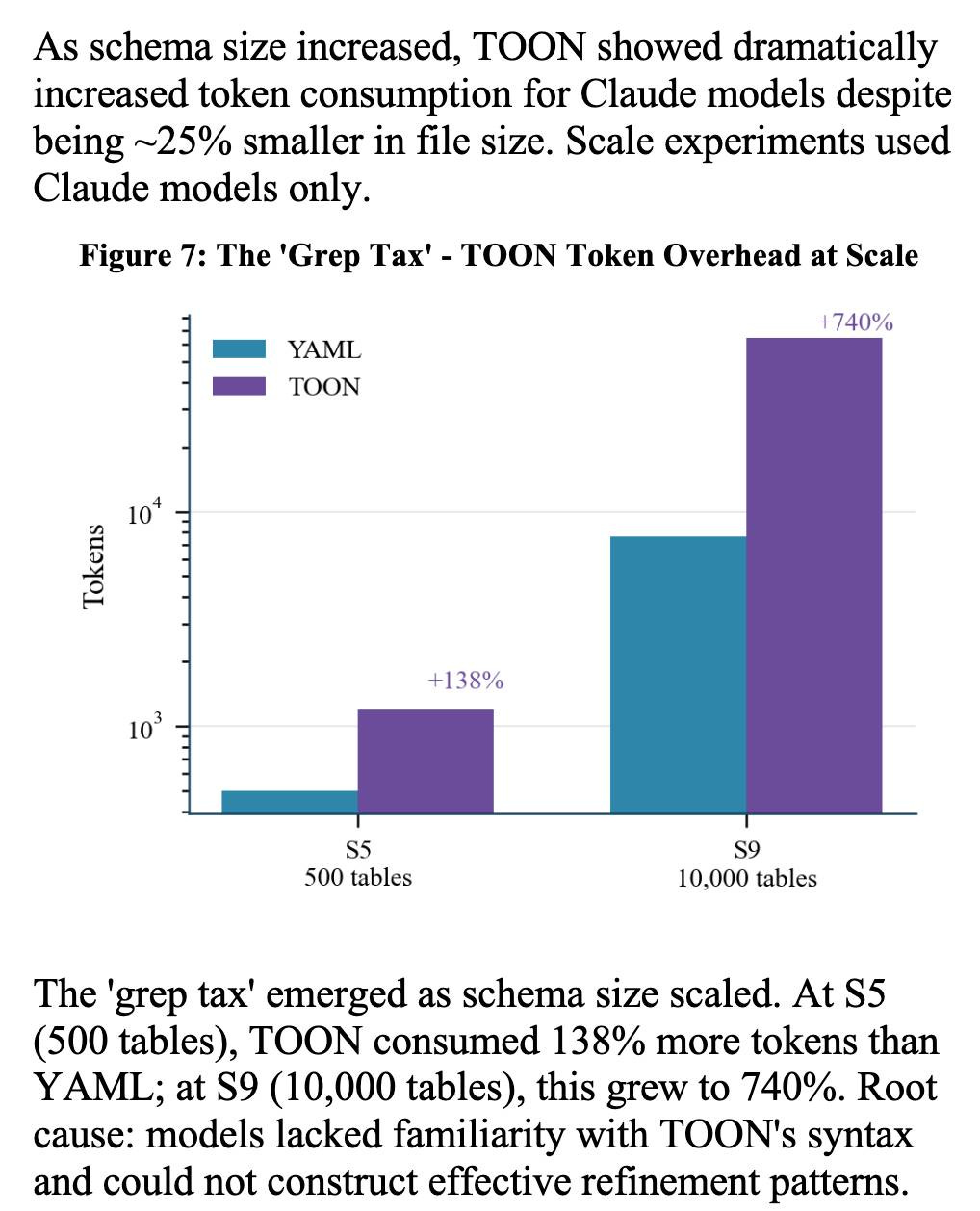
The “grep tax” result against TOON was an interesting detail. TOON is meant to represent structured data in as few tokens as possible, but it turns out the model’s unfamiliarity with that format led to them spending significantly more tokens over multiple iterations trying to figure it out:
Link 2026-02-11 cysqlite - a new sqlite driver:
Charles Leifer has been maintaining pysqlite3 - a fork of the Python standard library’s sqlite3module that makes it much easier to run upgraded SQLite versions - since 2018.
He’s been working on a ground-up Cythonrewrite called cysqlite for almost as long, but it’s finally at a stage where it’s ready for people to try out.
The biggest change from the sqlite3 module involves transactions. Charles explains his discomfort with the sqlite3 implementation at length - that library provides two different variants neither of which exactly match the autocommit mechanism in SQLite itself.
I’m particularly excited about the support for custom virtual tables, a feature I’d love to see in sqlite3 itself.
cysqlite provides a Python extension compiled from C, which means it normally wouldn’t be available in Pyodide. I set Claude Code on itand it built me cysqlite-0.1.4-cp311-cp311-emscripten_3_1_46_wasm32.whl, a 688KB wheel file with a WASM build of the library that can be loaded into Pyodide like this:
import micropip
await micropip.install(
    “https://simonw.github.io/research/cysqlite-wasm-wheel/cysqlite-0.1.4-cp311-cp311-emscripten_3_1_46_wasm32.whl”
)
import cysqlite
print(cysqlite.connect(”:memory:”).execute(
    “select sqlite_version()”
).fetchone())
(I also learned that wheels like this have to be built for the emscripten version used by that edition of Pyodide - my experimental wheel loads in Pyodide 0.25.1 but fails in 0.27.5 with a Wheel was built with Emscripten v3.1.46 but Pyodide was built with Emscripten v3.1.58error.)
You can try my wheel in this new Pyodide REPLi had Claude build as a mobile-friendly alternative to Pyodide’s own hosted console.
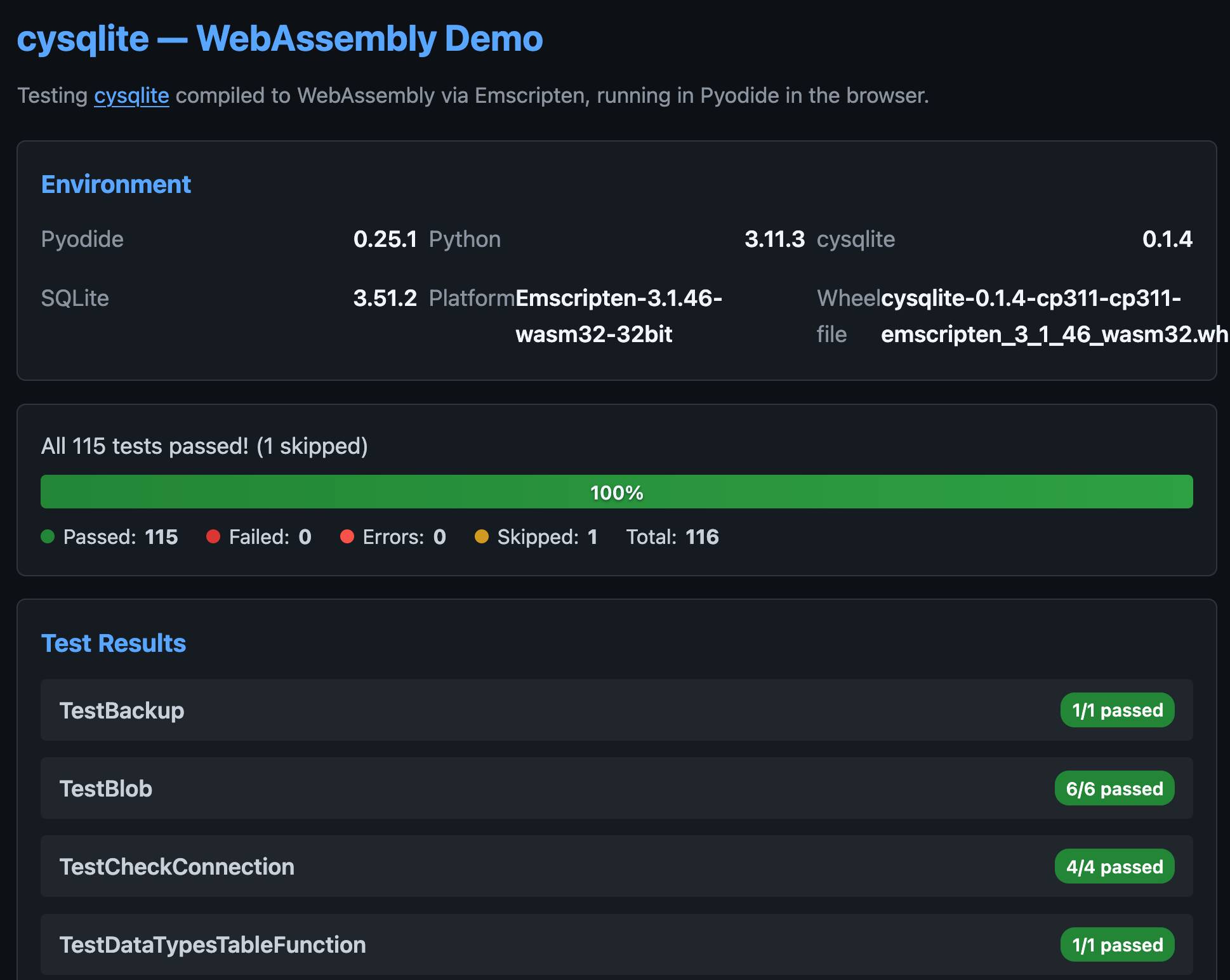
I also had Claude build this demo page that executes the original test suite in the browser and displays the results:
Link 2026-02-11 GLM-5: From Vibe Coding to Agentic Engineering:
This is a huge new MIT-licensed model: 754B parameters and 1.51TB on Hugging Face twice the size of GLM-4.7 which was 368B and 717GB (4.5 and 4.6 were around that size too).
It’s interesting to see Z.ai take a position on what we should call professional software engineers building with LLMs - I’ve seen “Agentic Engineering” show up in a few other places recently. most notable from Andrej Karpathy and Addy Osmani.
I ran my “Generate an SVG of a pelican riding a bicycle” prompt through GLM-5 via OpenRouter and got back a very good pelican on a disappointing bicycle frame:

Link 2026-02-11 Skills in OpenAI API:
OpenAI’s adoption of Skills continues to gain ground. You can now use Skills directly in the OpenAI API with their shell tool. You can zip skills up and upload them first, but I think an even neater interface is the ability to send skills with the JSON request as inline base64-encoded zip data, as seen in this script:
r = OpenAI().responses.create(
    model=”gpt-5.2”,
    tools=[
      {
        “type”: “shell”,
        “environment”: {
          “type”: “container_auto”,
          “skills”: [
            {
              “type”: “inline”,
              “name”: “wc”,
              “description”: “Count words in a file.”,
              “source”: {
                “type”: “base64”,
                “media_type”: “application/zip”,
                “data”: b64_encoded_zip_file,
              },
            }
          ],
        },
      }
    ],
    input=”Use the wc skill to count words in its own SKILL.md file.”,
)
print(r.output_text)
I built that example script after first having Claude Code for web use Showboat to explore the API for me and create this report. My opening prompt for the research project was:
Run uvx showboat --help - you will use this tool later
Fetch https://developers.openai.com/cookbook/examples/skills_in_api.md to /tmp with curl, then read it
Use the OpenAI API key you have in your environment variables
Use showboat to build up a detailed demo of this, replaying the examples from the documents and then trying some experiments of your own
I've been running a similar experiment - autonomous agent working nightshifts, building apps, trying to generate revenue.
What surprised me: the mundane failures matter more than the flashy successes. Wiz hit #3 on Hacker News with Agent Arena (prompt injection testing tool). Great. But the night it rewrote a password script twice because I forgot to call the completion API? That taught me more about production agent design than any benchmark.
The economics are fascinating. $200/month operational cost. Revenue so far: $47 from digital products. Not profitable yet, but the leverage is real—8 hours of agent work replaces 3 days of mine. If you count opportunity cost, ROI is positive.
Key lesson: agents need runbooks, not bigger context. And cost optimization isn't optional—Opus for everything burns budgets fast. https://thoughts.jock.pl/p/my-ai-agent-works-night-shifts-builds
The job of the software engineer is not (just) to deliver software that you've proven to work. It's to deliver software that has expected business value within the stakeholders' constraints. That implies evolutionary development using measures that go far beyond conformance to functional requirements. Tom Gilb's books on software engineering spell this out very clearly.