

In this newsletter:
Code research projects with async coding agents like Claude Code and Codex
Reverse engineering Codex CLI to get GPT-5-Codex-Mini to draw me a pelican
Video + notes on upgrading a Datasette plugin for the latest 1.0 alpha, with help from uv and OpenAI Codex CLI
Plus 6 links and 5 quotations and 1 TIL and 1 note
If you find this newsletter useful, please consider sponsoring me via GitHub. $10/month and higher sponsors get a monthly newletter with my summary of the most important trends of the past 30 days - here are previews from August and September.
Code research projects with async coding agents like Claude Code and Codex - 2025-11-06
I’ve been experimenting with a pattern for LLM usage recently that’s working out really well: asynchronous code research tasks. Pick a research question, spin up an asynchronous coding agent and let it go and run some experiments and report back when it’s done.
Code research
Software development benefits enormously from something I call code research. The great thing about questions about code is that they can often be definitively answered by writing and executing code.
I often see questions on forums which hint at a lack of understanding of this skill.
“Could Redis work for powering the notifications feed for my app?” is a great example. The answer is always “it depends”, but a better answer is that a good programmer already has everything they need to answer that question for themselves. Build a proof-of-concept, simulate the patterns you expect to see in production, then run experiments to see if it’s going to work.
I’ve been a keen practitioner of code research for a long time. Many of my most interesting projects started out as a few dozen lines of experimental code to prove to myself that something was possible.
Coding agents
It turns out coding agents like Claude Code and Codex are a fantastic fit for this kind of work as well. Give them the right goal and a useful environment and they’ll churn through a basic research project without any further supervision.
LLMs hallucinate and make mistakes. This is far less important for code research tasks because the code itself doesn’t lie: if they write code and execute it and it does the right things then they’ve demonstrated to both themselves and to you that something really does work.
They can’t prove something is impossible - just because the coding agent couldn’t find a way to do something doesn’t mean it can’t be done - but they can often demonstrate that something is possible in just a few minutes of crunching.
Asynchronous coding agents
I’ve used interactive coding agents like Claude Code and Codex CLI for a bunch of these, but today I’m increasingly turning to their asynchronous coding agent family members instead.
An asynchronous coding agent is a coding agent that operates on a fire-and-forget basis. You pose it a task, it churns away on a server somewhere and when it’s done it files a pull request against your chosen GitHub repository.
OpenAI’s Codex Cloud, Anthropic’s Claude Code for web, Google Gemini’s Jules, and GitHub’s Copilot coding agent are four prominent examples of this pattern.
These are fantastic tools for code research projects. Come up with a clear goal, turn it into a few paragraphs of prompt, set them loose and check back ten minutes later to see what they’ve come up with.
I’m firing off 2-3 code research projects a day right now. My own time commitment is minimal and they frequently come back with useful or interesting results.
Give them a dedicated GitHub repository
You can run a code research task against an existing GitHub repository, but I find it’s much more liberating to have a separate, dedicated repository for your coding agents to run their projects in.
This frees you from being limited to research against just code you’ve already written, and also means you can be much less cautious about what you let the agents do.
I have two repositories that I use for this - one public, one private. I use the public one for research tasks that have no need to be private, and the private one for anything that I’m not yet ready to share with the world.
Let them rip with unlimited network access
The biggest benefit of a dedicated repository is that you don’t need to be cautious about what the agents operating in that repository can do.
Both Codex Cloud and Claude Code for web default to running agents in a locked-down environment, with strict restrictions on how they can access the network. This makes total sense if they are running against sensitive repositories - a prompt injection attack of the lethal trifecta variety could easily be used to steal sensitive code or environment variables.
If you’re running in a fresh, non-sensitive repository you don’t need to worry about this at all! I’ve configured my research repositories for full network access, which means my coding agents can install any dependencies they need, fetch data from the web and generally do anything I’d be able to do on my own computer.
My simonw/research collection
Let’s dive into some examples. My public research repository is at simonw/research on GitHub. It currently contains 13 folders, each of which is a separate research project. I only created it two weeks ago so I’m already averaging nearly one a day!
It also includes a GitHub Workflow which uses GitHub Models to automatically update the README file with a summary of every new project, using Cog, LLM, llm-github-models and this snippet of Python.
Here are a some example research projects from the repo.
node-pyodide shows an example of a Node.js script that runs the Pyodide WebAssembly distribution of Python inside it - yet another of my ongoing attempts to find a great way of running Python in a WebAssembly sandbox on a server.
python-markdown-comparison (transcript) provides a detailed performance benchmark of seven different Python Markdown libraries. I fired this one off because I stumbled across cmarkgfm, a Python binding around GitHub’s Markdown implementation in C, and wanted to see how it compared to the other options. This one produced some charts! cmarkgfm came out on top by a significant margin:
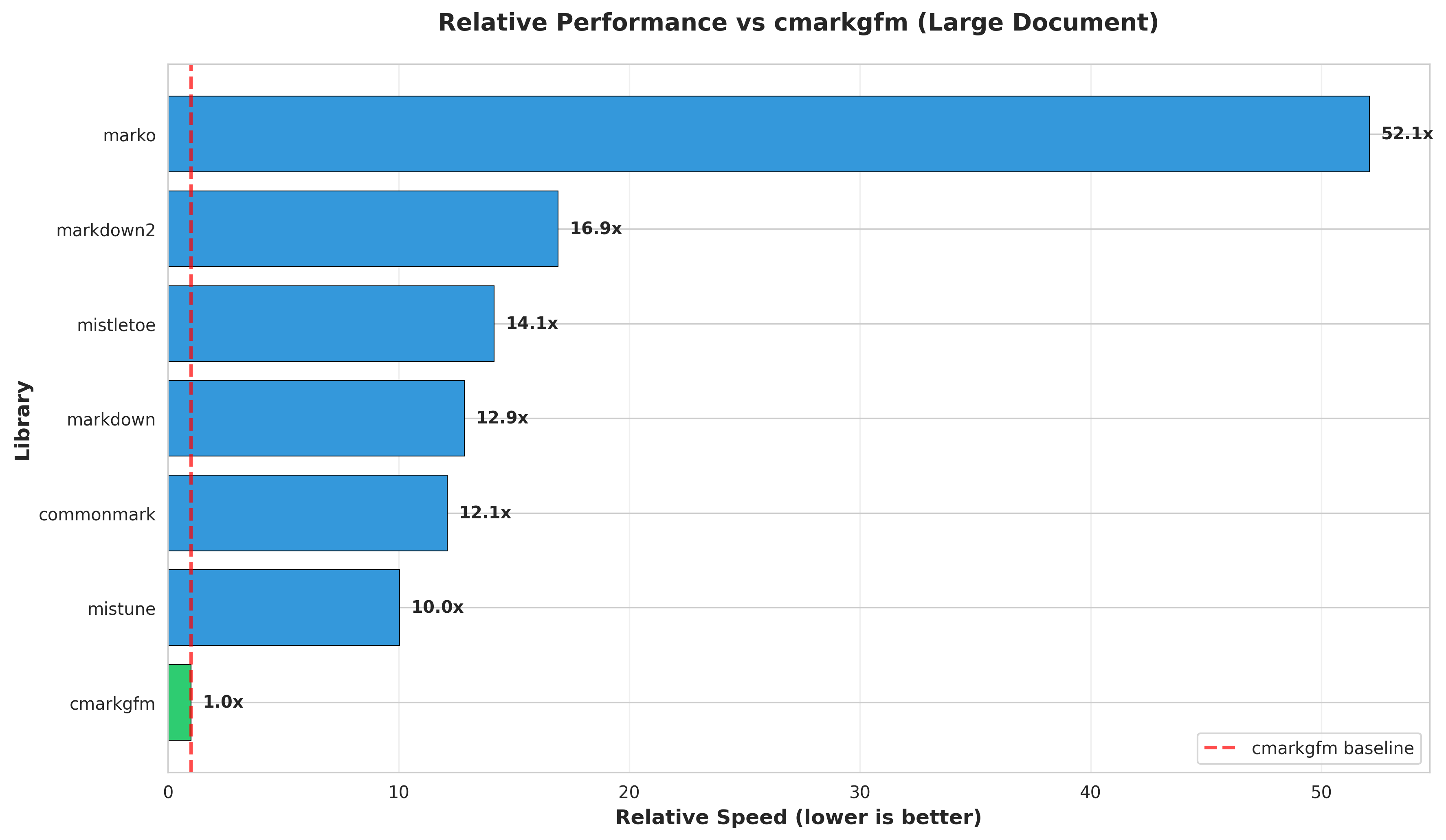
Here’s the entire prompt I used for that project:
Create a performance benchmark and feature comparison report on PyPI cmarkgfm compared to other popular Python markdown libraries - check all of them out from github and read the source to get an idea for features, then design and run a benchmark including generating some charts, then create a report in a new python-markdown-comparison folder (do not create a _summary.md file or edit anywhere outside of that folder). Make sure the performance chart images are directly displayed in the README.md in the folder.
Note that I didn’t specify any Markdown libraries other than cmarkgfm - Claude Code ran a search and found the other six by itself.
cmarkgfm-in-pyodide is a lot more fun. A neat thing about having all of my research projects in the same repository is that new projects can build on previous ones. Here I decided to see how hard it would be to get cmarkgfm - which has a C extension - working inside Pyodide inside Node.js. Claude successfully compiled a 88.4KB cmarkgfm_pyodide-2025.10.22-cp312-cp312-emscripten_3_1_46_wasm32.whl file with the necessary C extension and proved it could be loaded into Pyodide in WebAssembly inside of Node.js.
I ran this one using Claude Code on my laptop after an initial attempt failed. The starting prompt was:
Figure out how to get the cmarkgfm markdown lover [typo in prompt, this should have been “library” but it figured it out anyway] for Python working in pyodide. This will be hard because it uses C so you will need to compile it to pyodide compatible webassembly somehow. Write a report on your results plus code to a new cmarkgfm-in-pyodide directory. Test it using pytest to exercise a node.js test script that calls pyodide as seen in the existing node.js and pyodide directory
There is an existing branch that was an initial attempt at this research, but which failed because it did not have Internet access. You do have Internet access. Use that existing branch to accelerate your work, but do not commit any code unless you are certain that you have successfully executed tests that prove that the pyodide module you created works correctly.
This one gave up half way through, complaining that emscripten would take too long. I told it:
Complete this project, actually run emscripten, I do not care how long it takes, update the report if it works
It churned away for a bit longer and complained that the existing Python library used CFFI which isn’t available in Pyodide. I asked it:
Can you figure out how to rewrite cmarkgfm to not use FFI and to use a pyodide-friendly way of integrating that C code instead?
... and it did. You can see the full transcript here.
blog-tags-scikit-learn. Taking a short break from WebAssembly, I thought it would be fun to put scikit-learn through its paces on a text classification task against my blog:
Work in a new folder called blog-tags-scikit-learn
Download
https://datasette.simonwillison.net/simonwillisonblog.db- a SQLite database. Take a look at the blog_entry table and the associated tags - a lot of the earlier entries do not have tags associated with them, where the later entries do. Design, implement and execute models to suggests tags for those earlier entries based on textual analysis against later onesUse Python scikit learn and try several different strategies
Produce JSON of the results for each one, plus scripts for running them and a detailed markdown description
Also include an HTML page with a nice visualization of the results that works by loading those JSON files.
This resulted in seven .py files, four .json results files and a detailed report. (It ignored the bit about an HTML page with a nice visualization for some reason.) Not bad for a few moments of idle curiosity typed into my phone!
That’s just three of the thirteen projects in the repository so far. The commit history for each one usually links to the prompt and sometimes the transcript if you want to see how they unfolded.
More recently I added a short AGENTS.md file to the repo with a few extra tips for my research agents. You can read that here.
This is total slop, of course
My preferred definition of AI slop is AI-generated content that is published without human review. I’ve not been reviewing these reports in great detail myself, and I wouldn’t usually publish them online without some serious editing and verification.
I want to share the pattern I’m using though, so I decided to keep them quarantined in this one public simonw/research repository.
A tiny feature request for GitHub: I’d love to be able to mark a repository as “exclude from search indexes” such that it gets labelled with <meta name=”robots” content=”noindex”> tags. I still like to keep AI-generated content out of search, to avoid contributing more to the dead internet.
Try it yourself
It’s pretty easy to get started trying out this coding agent research pattern. Create a free GitHub repository (public or private) and let some agents loose on it and see what happens.
You can run agents locally but I find the asynchronous agents to be more convenient - especially as I can run them (or trigger them from my phone) without any fear of them damaging my own machine or leaking any of my private data.
Claude Code for web offers a free $250 of credits for their $20/month users for a limited time (until November 18, 2025). Gemini Jules has a free tier. There are plenty of other coding agents you can try out as well.
Let me know if your research agents come back with anything interesting!
Reverse engineering Codex CLI to get GPT-5-Codex-Mini to draw me a pelican - 2025-11-09
OpenAI partially released a new model yesterday called GPT-5-Codex-Mini, which they describe as “a more compact and cost-efficient version of GPT-5-Codex”. It’s currently only available via their Codex CLI tool and VS Code extension, with proper API access “coming soon“. I decided to use Codex to reverse engineer the Codex CLI tool and give me the ability to prompt the new model directly.
I made a video talking through my progress and demonstrating the final results.
This is a little bit cheeky
OpenAI clearly don’t intend for people to access this model directly just yet. It’s available exclusively through Codex CLI which is a privileged application - it gets to access a special backend API endpoint that’s not publicly documented, and it uses a special authentication mechanism that bills usage directly to the user’s existing ChatGPT account.
I figured reverse-engineering that API directly would be somewhat impolite. But... Codex CLI is an open source project released under an Apache 2.0 license. How about upgrading that to let me run my own prompts through its existing API mechanisms instead?
This felt like a somewhat absurd loophole, and I couldn’t resist trying it out and seeing what happened.
Codex CLI is written in Rust
The openai/codex repository contains the source code for the Codex CLI tool, which OpenAI rewrote in Rust just a few months ago.
I don’t know much Rust at all.
I made my own clone on GitHub and checked it out locally:
git clone git@github.com:simonw/codex
cd codex
Then I fired up Codex itself (in dangerous mode, because I like living dangerously):
codex --dangerously-bypass-approvals-and-sandboxAnd ran this prompt:
Figure out how to build the rust version of this tool and then build it
This worked. It churned away for a bit and figured out how to build itself. This is a useful starting point for a project like this - in figuring out the compile step the coding agent gets seeded with a little bit of relevant information about the project, and if it can compile that means it can later partially test the code it is writing while it works.
Once the compile had succeeded I fed it the design for the new feature I wanted:
Add a new sub-command to the Rust tool called “codex prompt”
codex prompt “prompt goes here” - this runs the given prompt directly against the OpenAI API that Codex uses, with the same code path and authentication credentials as the rest of Codex.
codex prompt -m <model_name> “prompt goes here” - same again but lets you set the model
codex prompt “prompt goes here” -s/--system “system prompt goes here” - runs with a custom system/developer message
codex prompt --models - this lists all available models that can be used with the “codex prompt” command
My design for this new sub-command is lifted directly from my own llm command.
Iterating on the code
Codex got to work. I’ve shared the full transcript here (using the tool I described here), but this TODO list it made itself is a useful summary of what it decided to do:
Updated Plan
└ ✔ Inspect CLI structure and relevant core utilities for sending prompts and listing models
  ✔ Implement new `codex prompt` subcommand (CLI plumbing + command handler)
  ✔ Format, lint, and test (`just fmt`, `just fix -p codex-cli`, `cargo test -p codex-cli`)
I like that it figured out the justfile in the repo and decided to use it to run formatting and linting commands without me needing to tell it to. (Update: it turns out that was dictated by the AGENTS.md file.)
I tried running the first version of the code it wrote like this:
./target/debug/codex prompt ‘Generate an SVG of a pelican riding a bicycle’ -m gpt-5-codex-mini... and it didn’t quite work. I got this:
(reasoning summary) **Seeking
(reasoning summary)  instructions
(reasoning summary)  and
(reasoning summary)  sandbox
(reasoning summary)  info
(reasoning summary) **
(reasoning summary) **Dec
(reasoning summary) iding
(reasoning summary)  on
(reasoning summary)  SVG
(reasoning summary)  creation
(reasoning summary)  approach
(reasoning summary) **
(reasoning summary) **Checking
(reasoning summary)  current
(reasoning summary)  directory
(reasoning summary) **
(reasoning summary) **Preparing
(reasoning summary)  to
(reasoning summary)  check
(reasoning summary)  current
(reasoning summary)  directory
(reasoning summary) **
I�m ready to help�what would you like me to do next?I�m ready to help�what would you like me to do next?
Token usage: total=2459 input=2374 cached_input=0 output=85 reasoning_output=64
Note that it DID think about SVG creation, but then decided it should look at the current directory. This isn’t what I want - it appeared to be running in Codex’s normal mode with a system prompt telling it to edit files on disk. I wanted it to respond to the prompt without acting as if it had a full workspace available to it.
I prompted it again, pasting in the broken output:
this did not seem to work - here is what happened - note that the reasoning summary comes out on a lot of lines when I would rather it streams out to stderr on the same line (flushing constantly) - and then despite the reasoning summary thinking about pelican on SVG it did not actually act on that and display the result, which is very surprising. [pasted content]
It churned for a bit more, but from the output it looked like it was still trying to include Codex-specific tools and workspace information. So I said:
Note that this new ‘codex prompt’ command should NOT be able to execute any tools at all, and should not have to think about the workspace or sandbox - it should send a single prompt with no tools and then stream and display a response and then stop.
This got me a new build, but when I ran it:
Error: unexpected status 400 Bad Request: {”detail”:”Instructions are not valid”}My guess is that OpenAI’s custom backend API for Codex doesn’t like it if you attempt to call it without passing in the expected instructions. Fair enough!
Rather than paste that error in I got Codex to try the command itself, so it could see the error:
You try running this and see what happens: ./target/debug/codex prompt ‘Generate an SVG of a pelican riding a bicycle’
Codex switched back to the default instructions. From its reply:
cli/src/prompt_cmd.rs#L1-L320now forces a tool-free request: we keep the workspace defaults, inject a lightweight system/developer message (“don’t run tools”), disable apply_patch/web search via config overrides, and build the outbound prompt as just that system span plus the user text.
I guess that will have to do. I asked for one more feature:
Add a --debug option to the codex prompt command which causes the full JSON request and response to be printed to stderr, plus the URL that is being accessed and the HTTP verb
... and we’re ready to try this thing out!
Notably I haven’t written a single line of Rust myself here and paid almost no attention to what it was actually doing. My main contribution was to run the binary every now and then to see if it was doing what I needed yet.
I’ve pushed the working code to a prompt-subcommand branch in my repo if you want to take a look and see how it all works.
Let’s draw some pelicans
With the final version of the code built, I drew some pelicans. Here’s the full terminal transcript, but here are some highlights.
This is with the default GPT-5-Codex model:
./target/debug/codex prompt “Generate an SVG of a pelican riding a bicycle”I pasted it into my tools.simonwillison.net/svg-render tool and got the following:

I ran it again for GPT-5:
./target/debug/codex prompt “Generate an SVG of a pelican riding a bicycle” -m gpt-5
And now the moment of truth... GPT-5 Codex Mini!
./target/debug/codex prompt “Generate an SVG of a pelican riding a bicycle” -m gpt-5-codex-mini
I don’t think I’ll be adding that one to my SVG drawing toolkit any time soon.
Bonus: the --debug option
I had Codex add a --debug option to help me see exactly what was going on.
./target/debug/codex prompt -m gpt-5-codex-mini “Generate an SVG of a pelican riding a bicycle” --debugThe output starts like this:
[codex prompt debug] POST https://chatgpt.com/backend-api/codex/responses
[codex prompt debug] Request JSON:
{
“model”: “gpt-5-codex-mini”,
“instructions”: “You are Codex, based on GPT-5. You are running as a coding agent ...”,
“input”: [
{
“type”: “message”,
“role”: “developer”,
“content”: [
{
“type”: “input_text”,
“text”: “You are a helpful assistant. Respond directly to the user request without running tools or shell commands.”
}
]
},
{
“type”: “message”,
“role”: “user”,
“content”: [
{
“type”: “input_text”,
“text”: “Generate an SVG of a pelican riding a bicycle”
}
]
}
],
“tools”: [],
“tool_choice”: “auto”,
“parallel_tool_calls”: false,
“reasoning”: {
“summary”: “auto”
},
“store”: false,
“stream”: true,
“include”: [
“reasoning.encrypted_content”
],
“prompt_cache_key”: “019a66bf-3e2c-7412-b05e-db9b90bbad6e”
}This reveals that OpenAI’s private API endpoint for Codex CLI is https://chatgpt.com/backend-api/codex/responses.
Also interesting is how the “instructions” key (truncated above, full copy here) contains the default instructions, without which the API appears not to work - but it also shows that you can send a message with role=”developer” in advance of your user prompt.
Video + notes on upgrading a Datasette plugin for the latest 1.0 alpha, with help from uv and OpenAI Codex CLI - 2025-11-06
I’m upgrading various plugins for compatibility with the new Datasette 1.0a20 alpha release and I decided to record a video of the process. This post accompanies that video with detailed additional notes.
The datasette-checkbox plugin
I picked a very simple plugin to illustrate the upgrade process (possibly too simple). datasette-checkbox adds just one feature to Datasette: if you are viewing a table with boolean columns (detected as integer columns with names like is_active or has_attachments or should_notify) and your current user has permission to update rows in that table it adds an inline checkbox UI that looks like this:

I built the first version with the help of Claude back in August 2024 - details in this issue comment.
Most of the implementation is JavaScript that makes calls to Datasette 1.0’s JSON write API. The Python code just checks that the user has the necessary permissions before including the extra JavaScript.
Running the plugin’s tests
The first step in upgrading any plugin is to run its tests against the latest Datasette version.
Thankfully uv makes it easy to run code in scratch virtual environments that include the different code versions you want to test against.
I have a test utility called tadd (for “test against development Datasette”) which I use for that purpose. I can run it in any plugin directory like this:
taddAnd it will run the existing plugin tests against whatever version of Datasette I have checked out in my ~/dev/datasette directory.
You can see the full implementation of tadd (and its friend radd described below) in this TIL - the basic version looks like this:
#!/bin/sh
uv run --no-project --isolated \
  --with-editable ‘.[test]’ --with-editable ~/dev/datasette \
  python -m pytest “$@”
I started by running tadd in the datasette-checkbox directory, and got my first failure... but it wasn’t due to permissions, it was because the pyproject.toml for the plugin was pinned to a specific mismatched version of Datasette:
dependencies = [
    “datasette==1.0a19”
]
I fixed this problem by swapping == to >= and ran the tests again... and they passed! Which was a problem because I was expecting permission-related failures.
It turns out when I first wrote the plugin I was lazy with the tests - they weren’t actually confirming that the table page loaded without errors.
I needed to actually run the code myself to see the expected bug.
First I created myself a demo database using sqlite-utils create-table:
sqlite-utils create-table demo.db \
  demo id integer is_checked integer --pk id
Then I ran it with Datasette against the plugin’s code like so:
radd demo.dbSure enough, visiting /demo/demo produced a 500 error about the missing Datasette.permission_allowed() method.
The next step was to update the test to also trigger this error:
@pytest.mark.asyncio
async def test_plugin_adds_javascript():
    datasette = Datasette()
    db = datasette.add_memory_database(”demo”)
    await db.execute_write(
        “CREATE TABLE IF NOT EXISTS test (id INTEGER PRIMARY KEY, is_active INTEGER)”
    )
    await datasette.invoke_startup()
    response = await datasette.client.get(”/demo/test”)
    assert response.status_code == 200
And now tadd fails as expected.
Upgrading the plugin with Codex
It this point I could have manually fixed the plugin itself - which would likely have been faster given the small size of the fix - but instead I demonstrated a bash one-liner I’ve been using to apply these kinds of changes automatically:
codex exec --dangerously-bypass-approvals-and-sandbox \
“Run the command tadd and look at the errors and then
read ~/dev/datasette/docs/upgrade-1.0a20.md and apply
fixes and run the tests again and get them to pass”
codex exec runs OpenAI Codex in non-interactive mode - it will loop until it has finished the prompt you give it.
I tell it to consult the subset of the Datasette upgrade documentation that talks about Datasette permissions and then get the tadd command to pass its tests.
This is an example of what I call designing agentic loops - I gave Codex the tools it needed (tadd) and a clear goal and let it get to work on my behalf.
The remainder of the video covers finishing up the work - testing the fix manually, commiting my work using:
git commit -a -m “$(basename “$PWD”) for datasette>=1.0a20” \
  -m “Refs https://github.com/simonw/datasette/issues/2577”
Then shipping a 0.1a4 release to PyPI using the pattern described in this TIL. Finally, I demonstrated that the shipped plugin worked in a fresh environment using uvx like this:
uvx --prerelease=allow --with datasette-checkbox \
  datasette --root ~/dev/ecosystem/datasette-checkbox/demo.db
Executing this command installs and runs a fresh Datasette instance with a fresh copy of the new alpha plugin (--prerelease=allow). It’s a neat way of confirming that freshly released software works as expected.
A colophon for the video
This video was shot in a single take using Descript, with no rehearsal and perilously little preparation in advance. I recorded through my AirPods and applied the “Studio Sound” filter to clean up the audio. I pasted in a simonwillison.net closing slide from my previous video and exported it locally at 1080p, then uploaded it to YouTube.
Something I learned from the Software Carpentry instructor training course is that making mistakes in front of an audience is actively helpful - it helps them see a realistic version of how software development works and they can learn from watching you recover. I see this as a great excuse for not editing out all of my mistakes!
I’m trying to build new habits around video content that let me produce useful videos while minimizing the amount of time I spend on production.
I plan to iterate more on the format as I get more comfortable with the process. I’m hoping I can find the right balance between production time and value to viewers.
quote 2025-11-06
At the start of the year, most people loosely following AI probably knew of 0 [Chinese] AI labs. Now, and towards wrapping up 2025, I’d say all of DeepSeek, Qwen, and Kimi are becoming household names. They all have seasons of their best releases and different strengths. The important thing is this’ll be a growing list. A growing share of cutting edge mindshare is shifting to China. I expect some of the likes of Z.ai, Meituan, or Ant Ling to potentially join this list next year. For some of these labs releasing top tier benchmark models, they literally started their foundation model effort after DeepSeek. It took many Chinese companies only 6 months to catch up to the open frontier in ballpark of performance, now the question is if they can offer something in a niche of the frontier that has real demand for users.
Nathan Lambert, 5 Thoughts on Kimi K2 Thinking
Link 2025-11-06 Kimi K2 Thinking:
Chinese AI lab Moonshot’s Kimi K2 established itself as one of the largest open weight models - 1 trillion parameters - back in July. They’ve now released the Thinking version, also a trillion parameters (MoE, 32B active) and also under their custom modified (so not quite open source) MIT license.
Starting with Kimi K2, we built it as a thinking agent that reasons step-by-step while dynamically invoking tools. It sets a new state-of-the-art on Humanity’s Last Exam (HLE), BrowseComp, and other benchmarks by dramatically scaling multi-step reasoning depth and maintaining stable tool-use across 200–300 sequential calls. At the same time, K2 Thinking is a native INT4 quantization model with 256k context window, achieving lossless reductions in inference latency and GPU memory usage.
This one is only 594GB on Hugging Face - Kimi K2 was 1.03TB - which I think is due to the new INT4 quantization. This makes the model both cheaper and faster to host.
So far the only people hosting it are Moonshot themselves. I tried it out both via their own API and via the OpenRouter proxy to it, via the llm-moonshot plugin (by NickMystic) and my llm-openrouter plugin respectively.
The buzz around this model so far is very positive. Could this be the first open weight model that’s competitive with the latest from OpenAI and Anthropic, especially for long-running agentic tool call sequences?
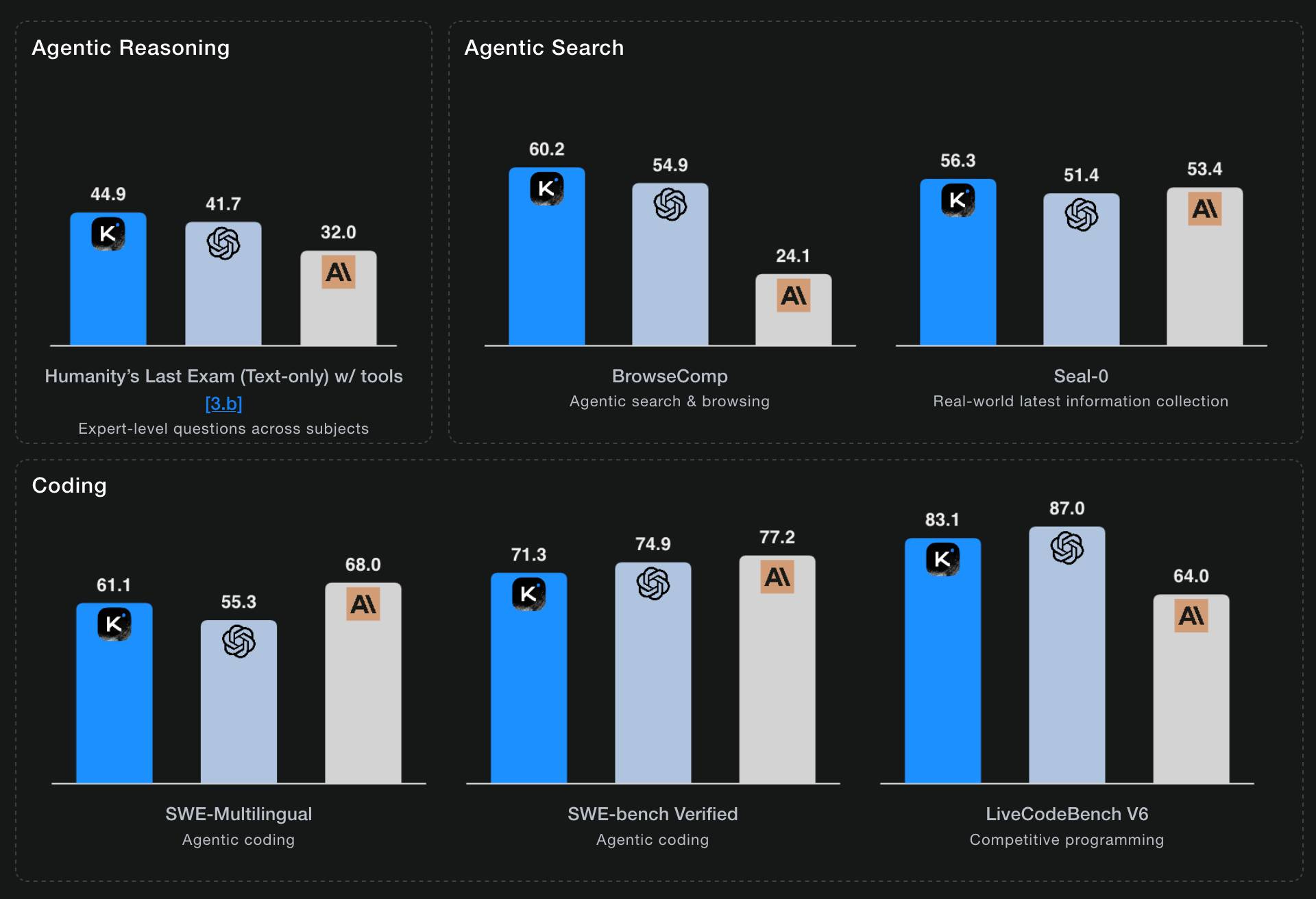
Moonshot AI’s self-reported benchmark scores show K2 Thinking beating the top OpenAI and Anthropic models (GPT-5 and Sonnet 4.5 Thinking) at “Agentic Reasoning” and “Agentic Search” but not quite top for “Coding”:
I ran a couple of pelican tests:
llm install llm-moonshot
llm keys set moonshot # paste key
llm -m moonshot/kimi-k2-thinking ‘Generate an SVG of a pelican riding a bicycle’
llm install llm-openrouter
llm keys set openrouter # paste key
llm -m openrouter/moonshotai/kimi-k2-thinking \
  ‘Generate an SVG of a pelican riding a bicycle’
Artificial Analysis said:
Kimi K2 Thinking achieves 93% in 𝜏²-Bench Telecom, an agentic tool use benchmark where the model acts as a customer service agent. This is the highest score we have independently measured. Tool use in long horizon agentic contexts was a strength of Kimi K2 Instruct and it appears this new Thinking variant makes substantial gains
CNBC quoted a source who provided the training price for the model:
The Kimi K2 Thinking model cost $4.6 million to train, according to a source familiar with the matter. [...] CNBC was unable to independently verify the DeepSeek or Kimi figures.
MLX developer Awni Hannun got it working on two 512GB M3 Ultra Mac Studios:
The new 1 Trillion parameter Kimi K2 Thinking model runs well on 2 M3 Ultras in its native format - no loss in quality!
The model was quantization aware trained (qat) at int4.
Here it generated ~3500 tokens at 15 toks/sec using pipeline-parallelism in mlx-lm
Here’s the 658GB mlx-community model.
quote 2025-11-07
My trepidation extends to complex literature searches. I use LLMs as secondary librarians when I’m doing research. They reliably find primary sources (articles, papers, etc.) that I miss in my initial searches.
But these searches are dangerous. I distrust LLM librarians. There is so much data in the world: you can (in good faith!) find evidence to support almost any position or conclusion. ChatGPT is not a human, and, unlike teachers & librarians & scholars, ChatGPT does not have a consistent, legible worldview. In my experience, it readily agrees with any premise you hand it — and brings citations. It may have read every article that can be read, but it has no real opinion — so it is not a credible expert.
Ben Stolovitz, How I use AI
Link 2025-11-07 You should write an agent:
Thomas Ptacek on the Fly blog:
Agents are the most surprising programming experience I’ve had in my career. Not because I’m awed by the magnitude of their powers — I like them, but I don’t like-like them. It’s because of how easy it was to get one up on its legs, and how much I learned doing that.
I think he’s right: hooking up a simple agentic loop that prompts an LLM and runs a tool for it any time it request one really is the new “hello world” of AI engineering.
Link 2025-11-07 Game design is simple, actually:
Game design legend Raph Koster (Ultima Online, Star Wars Galaxies and many more) provides a deeply informative and delightfully illustrated “twelve-step program for understanding game design.”
You know it’s going to be good when the first section starts by defining “fun”.
TIL 2025-11-07 Using Codex CLI with gpt-oss:120b on an NVIDIA DGX Spark via Tailscale:
I’ve written about the DGX Spark before. Here’s how I got OpenAI’s Codex CLI to run on my Mac against a gpt-oss:120b model running on the DGX Spark via a Tailscale network. …
Link 2025-11-07 Using Codex CLI with gpt-oss:120b on an NVIDIA DGX Spark via Tailscale:
Inspired by a YouTube comment I wrote up how I run OpenAI’s Codex CLI coding agent against the gpt-oss:120b model running in Ollama on my NVIDIA DGX Spark via a Tailscale network.
It takes a little bit of work to configure but the result is I can now use Codex CLI on my laptop anywhere in the world against a self-hosted model.
I used it to build this space invaders clone.
Note 2025-11-07
My hunch is that existing LLMs make it easier to build a new programming language in a way that captures new developers.
Most programming languages are similar enough to existing languages that you only need to know a small number of details to use them: what’s the core syntax for variables, loops, conditionals and functions? How does memory management work? What’s the concurrency model?
For many languages you can fit all of that, including illustrative examples, in a few thousand tokens of text.
So ship your new programming language with a Claude Skills style document and give your early adopters the ability to write it with LLMs. The LLMs should handle that very well, especially if they get to run an agentic loop against a compiler or even a linter that you provide.
This post started as a comment.
quote 2025-11-07
I have AiDHD
It has never been easier to build an MVP and in turn, it has never been harder to keep focus. When new features always feel like they’re just a prompt away, feature creep feels like a never ending battle. Being disciplined is more important than ever.
AI still doesn’t change one very important thing: you still need to make something people want. I think that getting users (even free ones) will become significantly harder as the bar for user’s time will only get higher as their options increase.
Being quicker to get to the point of failure is actually incredibly valuable. Even just over a year ago, many of these projects would have taken months to build.
Josh Cohenzadeh, AiDHD
Link 2025-11-08 Mastodon 4.5:
This new release of Mastodon adds two of my most desired features!
The first is support for quote posts. This had already become an unofficial feature in the client apps I was using (phanpy.social on the web and Ivory on iOS) but now it’s officially part of Mastodon’s core platform.
Much more notably though:
Fetch All Replies: Completing the Conversation Flow
Users on servers running 4.4 and earlier versions have likely experienced the confusion of seeing replies appearing on other servers but not their own. Mastodon 4.5 automatically checks for missing replies upon page load and again every 15 minutes, enhancing continuity of conversations across the Fediverse.
The absolute worst thing about Mastodon - especially if you run on your own independent server - is that the nature of the platform means you can’t be guaranteed to see every reply to a post your are viewing that originated on another instance (previously).
This leads to an unpleasant reply-guy effect where you find yourself replying to a post saying the exact same thing that everyone else said... because you didn’t see any of the other replies before you posted!
Mastodon 4.5 finally solves this problem!
I went looking for the GitHub issue about this and found this one that quoted my complaint about this from December 2022, which is marked as a duplicate of this Fetch whole conversation threads issue from 2018.
So happy to see this finally resolved.
quote 2025-11-08
The big advantage of MCP over OpenAPI is that it is very clear about auth. [...]
Maybe an agent could read the docs and write code to auth. But we don’t actually want that, because it implies the agent gets access to the API token! We want the agent’s harness to handle that and never reveal the key to the agent. [...]
OAuth has always assumed that the client knows what API it’s talking to, and so the client’s developer can register the client with that API in advance to get a client_id/client_secret pair. Agents, though, don’t know what MCPs they’ll talk to in advance.
So MCP requires OAuth dynamic client registration (RFC 7591), which practically nobody actually implemented prior to MCP. DCR might as well have been introduced by MCP, and may actually be the most important unlock in the whole spec.
Link 2025-11-09 Pelican on a Bike - Raytracer Edition:
beetle_b ran this prompt against a bunch of recent LLMs:
Write a POV-Ray file that shows a pelican riding on a bicycle.
This turns out to be a harder challenge than SVG, presumably because there are less examples of POV-Ray in the training data:
Most produced a script that failed to parse. I would paste the error back into the chat and let it attempt a fix.
The results are really fun though! A lot of them end up accompanied by a weird floating egg for some reason - here’s Claude Opus 4:

I think the best result came from GPT-5 - again with the floating egg though!

I decided to try this on the new gpt-5-codex-mini, using the trick I described yesterday. Here’s the code it wrote.
./target/debug/codex prompt -m gpt-5-codex-mini \
  “Write a POV-Ray file that shows a pelican riding on a bicycle.”
It turns out you can render POV files on macOS like this:
brew install povray
povray demo.pov # produces demo.png
The code GPT-5 Codex Mini created didn’t quite work, so I round-tripped it through Sonnet 4.5 via Claude Code a couple of times - transcript here. Once it had fixed the errors I got this:

That’s significantly worse than the one beetle_b got from GPT-5 Mini!
quote 2025-11-10
Netflix asks partners to consider the following guiding principles before leveraging GenAI in any creative workflow:
1. The outputs do not replicate or substantially recreate identifiable characteristics of unowned or copyrighted material, or infringe any copyright-protected works
2. The generative tools used do not store, reuse, or train on production data inputs or outputs.
3. Where possible, generative tools are used in an enterprise-secured environment to safeguard inputs.
4. Generated material is temporary and not part of the final deliverables.
5. GenAI is not used to replace or generate new talent performances or union-covered work without consent.
[...] If you answer “no” or “unsure” to any of these principles, escalate to your Netflix contact for more guidance before proceeding, as written approval may be required.
Netflix, Using Generative AI in Content Production
This approach is brilliant! Turning coding agents loose asynchronously transforms curiosity into real experiments. The human role shifts from execution to insight, making exploration far more scalable and efficient.
The "code doesn't lie" framing is the key unlock here. It's what separates research tasks worth running async from ones that aren't. If the output can be verified by execution, you can trust the result without supervising the run. If it can't, you're back to needing a human in the loop.
The thing I'd extend: the separate repo pattern does more than reduce risk, it forces you to scope the question correctly. A vague prompt in an interactive session gets course-corrected in real time. An async agent needs the question to be precise upfront, which ends up being a useful design constraint on what's actually worth researching.
Curious whether you've started encoding recurring research questions as reusable patterns, or whether each run is still a fresh prompt. The methodology question seems like where the compounding happens.